Foundations of
Data Science

Spring 2026 | Data 2 (399)
Jeffrey M. Girard | Lecture 12c

Roadmap

  • Parse strings and build dates from individual components

  • Extract, round, and modify date-time components

  • Understand periods, durations, and intervals for time spans

Creating Dates & Times

What are Dates and Times?

  • Question: Why not just use strings for dates?

  • Dates and Times are special data types that understand the rules of the calendar and the clock.

  • Unlike strings, they know that leap years exist, how many days are in each month, and how to do math with time.

  • We use the {lubridate} package (part of the {tidyverse}) to work with them.
  • There are three main types to know: a date, a time, and a date-time (which contains both).

Current Date and Time

Question: How can I get the current date or time in R?

# Get the current date
today()
[1] "2026-04-06"
# Get the current date AND time
now()
[1] "2026-04-06 14:13:39 CDT"

Parsing Dates from Strings

Question: How do I convert a character string into a proper Date object?

We can build them from strings using the matching {lubridate} function.

# Year, Month, Day
ymd("2026-04-06")
[1] "2026-04-06"
# Month, Day, Year (even handles suffixes and commas)
mdy("April 6th, 2026")
[1] "2026-04-06"
# Day, Month, Year
dmy("06-Apr-2026")
[1] "2026-04-06"

Parsing Date-Times

Question: What if my string also includes the time?

ymd_hm("2026-04-06 16:00") # assumes SS=00 and UTC time zone
[1] "2026-04-06 16:00:00 UTC"
ymd_hms("2026-04-06 16:00:42") # assumes UTC time zone
[1] "2026-04-06 16:00:42 UTC"
ymd_hms("2026-04-06 16:00:42", tz = "US/Central") # fully explicit
[1] "2026-04-06 16:00:42 CDT"

Building from Components

Sometimes your data has the date components spread across multiple columns. We will use the flights dataset to see this in action.

data("flights", package = "nycflights13")

flights_dt <- flights |> 
  select(year, month, day, hour, minute, dep_delay) |> 
  print()
# A tibble: 336,776 × 6
   year month   day  hour minute dep_delay
  <int> <int> <int> <dbl>  <dbl>     <dbl>
1  2013     1     1     5     15         2
2  2013     1     1     5     29         4
3  2013     1     1     5     40         2
4  2013     1     1     5     45        -1
5  2013     1     1     6      0        -6
6  2013     1     1     5     58        -4
# ℹ 336,770 more rows

Making Dates and Date-Times

Question: How do I combine separate columns into one date variable?

flights_dt <- flights_dt |> 
  mutate(
    date = make_date(year, month, day),
    datetime = make_datetime(year, month, day, hour, minute)
  ) |> 
  print(n = 5)
# A tibble: 336,776 × 8
   year month   day  hour minute dep_delay date       datetime           
  <int> <int> <int> <dbl>  <dbl>     <dbl> <date>     <dttm>             
1  2013     1     1     5     15         2 2013-01-01 2013-01-01 05:15:00
2  2013     1     1     5     29         4 2013-01-01 2013-01-01 05:29:00
3  2013     1     1     5     40         2 2013-01-01 2013-01-01 05:40:00
4  2013     1     1     5     45        -1 2013-01-01 2013-01-01 05:45:00
5  2013     1     1     6      0        -6 2013-01-01 2013-01-01 06:00:00
# ℹ 336,771 more rows

Working with Components

Pulling out Pieces

Question: How do I get just the month or day out of a date-time?

# Start with a single date-time
my_datetime <- ymd_hms("2016-07-08 12:34:56")
year(my_datetime) # Year
[1] 2016
month(my_datetime) # Month (number)
[1] 7
mday(my_datetime) # Day of the month
[1] 8

Getting Labels

Question: Can I get the actual name of the month or weekday?

Yes, set label = TRUE to return a factor instead of a number.

# Get the month label
month(my_datetime, label = TRUE)
[1] Jul
12 Levels: Jan < Feb < Mar < Apr < May < Jun < Jul < Aug < Sep < ... < Dec
# Get the weekday label
wday(my_datetime, label = TRUE)
[1] Fri
Levels: Sun < Mon < Tue < Wed < Thu < Fri < Sat

Visualizing Weekdays

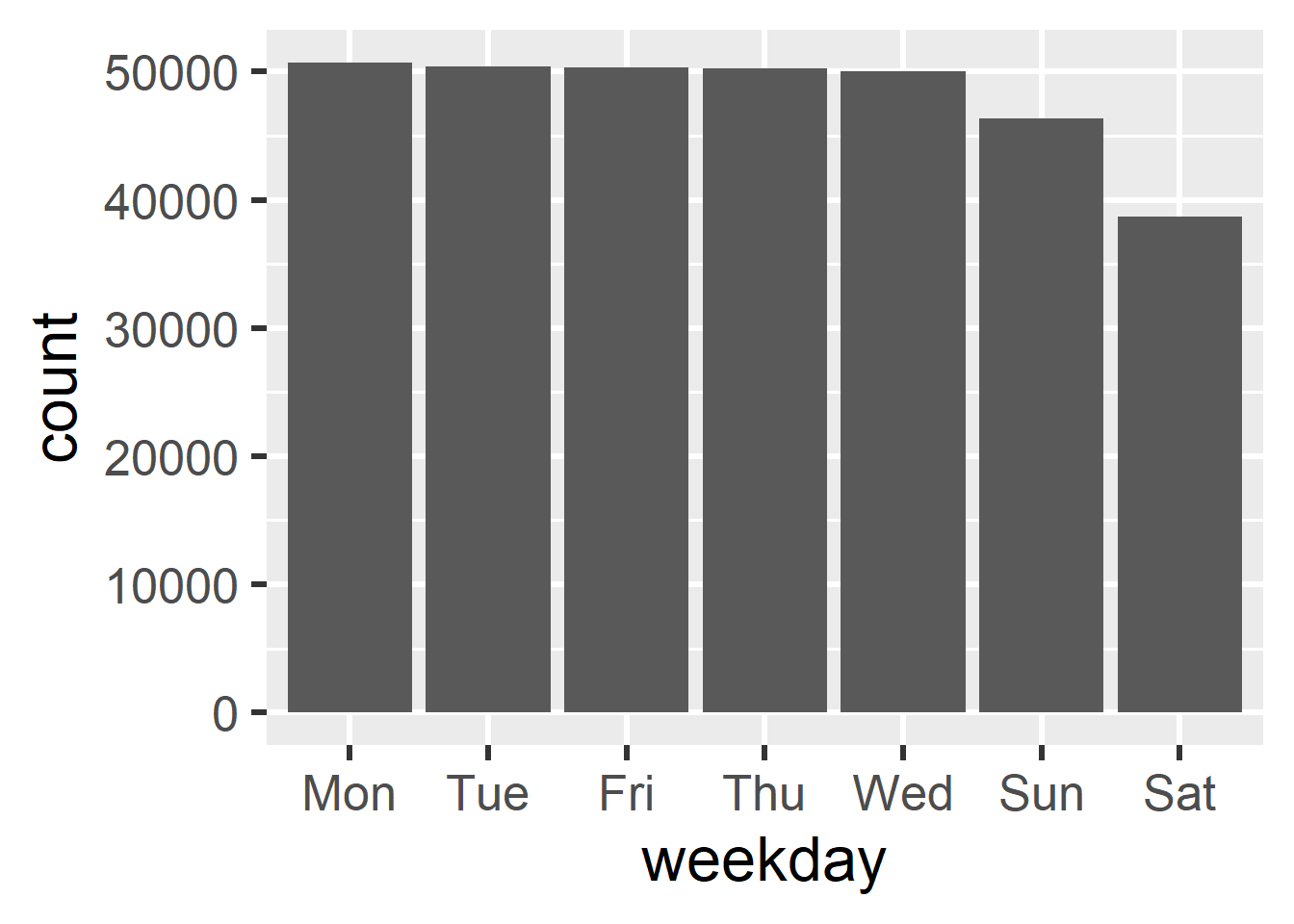
Extracting components is incredibly useful for summaries and plots.

# Which weekdays had the most flights?
flights_dt |> 
  mutate(
    weekday = wday(date, label = TRUE),
    weekday = fct_infreq(weekday)
  ) |> 
  ggplot(aes(x = weekday)) + 
  geom_bar()

Summarizing by Time

# Calculate average departure delay per weekday
flights_dt |> 
  mutate(weekday = wday(date, label = TRUE)) |> 
  summarize(
    .by = weekday,
    m_delay = mean(dep_delay, na.rm = TRUE)
  ) |> 
  arrange(m_delay) |> 
  print(n = 7)
# A tibble: 7 × 2
  weekday m_delay
  <ord>     <dbl>
1 Sat        7.65
2 Tue       10.6 
3 Sun       11.6 
4 Wed       11.8 
5 Fri       14.7 
6 Mon       14.8 
7 Thu       16.1 

Rounding Dates

Question: How can I group dates together by week or month?

# Round down to the nearest week
floor_date(my_datetime, unit = "week")
[1] "2016-07-03 UTC"
# Round to the nearest month
round_date(my_datetime, unit = "month")
[1] "2016-07-01 UTC"
# Round up to the nearest year
ceiling_date(my_datetime, unit = "year")
[1] "2017-01-01 UTC"

Visualizing Rounded Dates

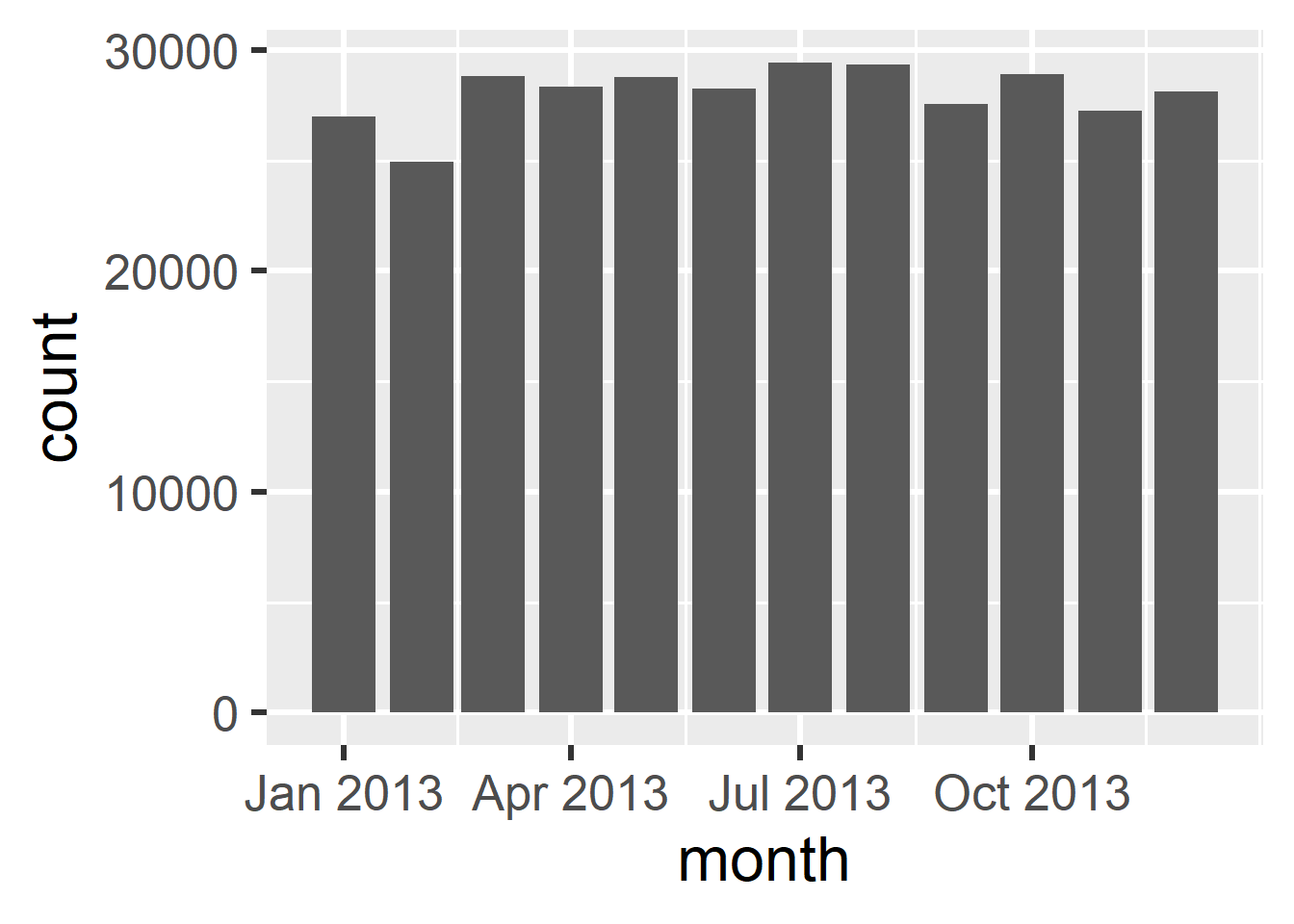
Rounding dates allows us to aggregate and plot data over time. Notice that the x-axis includes the year, which is redundant since it’s always 2013!

flights_dt |> 
  mutate(
    month = floor_date(
      date, 
      unit = "month"
    )
  ) |> 
  ggplot(aes(x = month)) + 
  geom_bar()

Formatting Date Axes

Question: How can I format the date labels on a plot’s axis?

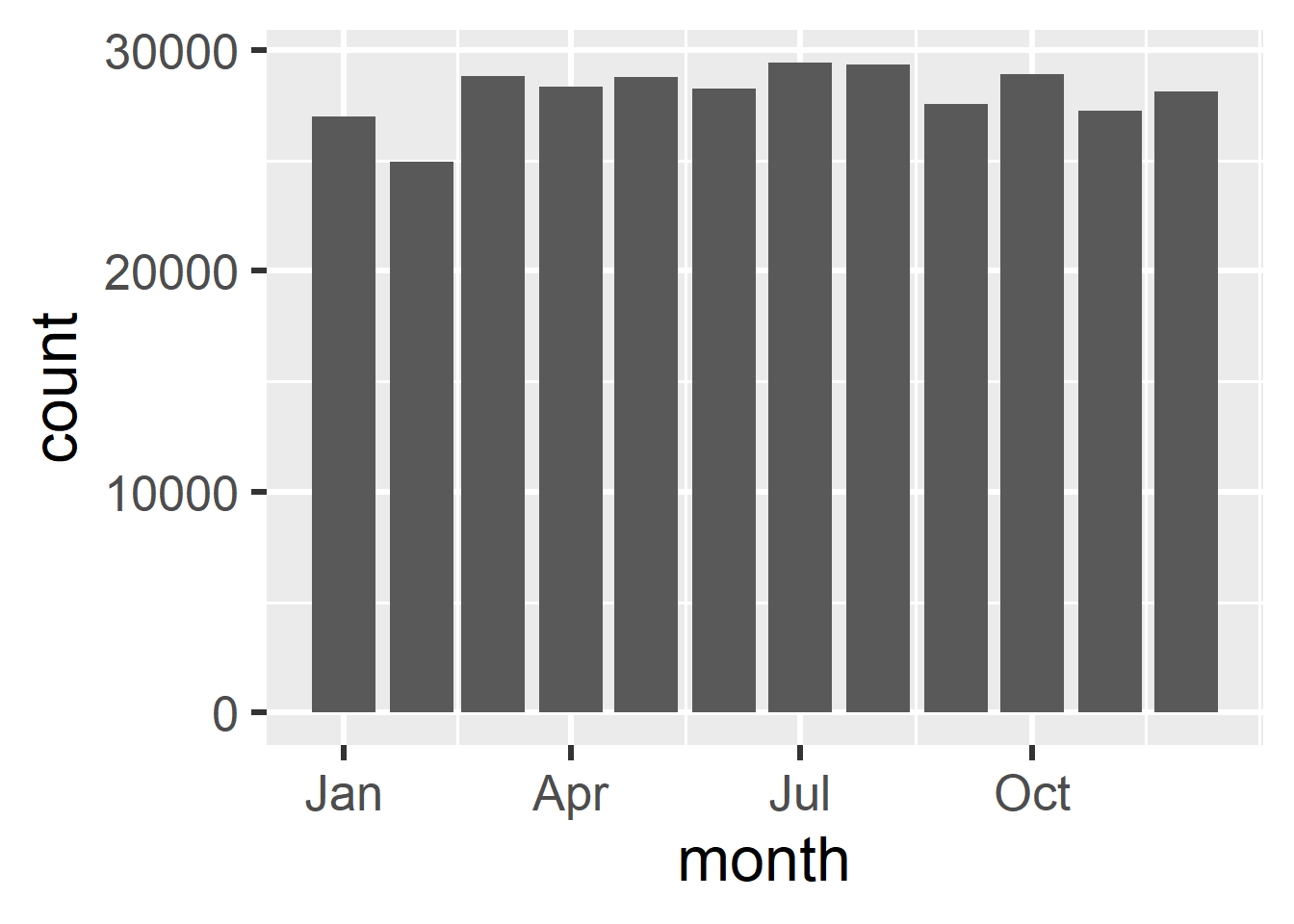
Use scale_x_date() with the date_labels argument. You can use special % codes to format the dates (e.g., %b for abbreviated month names).

flights_dt |> 
  mutate(
    month = floor_date(
      date, 
      unit = "month"
    )
  ) |> 
  ggplot(aes(x = month)) + 
  geom_bar() +
  scale_x_date(date_labels = "%b") 

Common Date Formats

When formatting dates for plots or parsing tricky strings, you will use special % codes to represent different calendar components.

Code Meaning Example
%Y 4-digit year “2026”
%y 2-digit year “26”
%m Month as a number “04”
%B Full month name “April”
%b Abbreviated month “Apr”
%d Day of the month “06”

Time Spans

Three Types of Time Spans

When doing math with time, R provides three different classes of time spans. Picking the right one depends on what you are trying to calculate.

  1. Periods: Represent “human” units of time like weeks and months.
  2. Durations: Represent an exact mathematical span of seconds.
  3. Intervals: Represent a specific span between a start and end point.

Periods

Periods use human logic, e.g., if you add one month to Jan 15, you get Feb 15th

# Periods use plural functions
days(7)
[1] "7d 0H 0M 0S"
months(2)
[1] "2m 0d 0H 0M 0S"
# We can add periods to a starting date
today() + days(7)
[1] "2026-04-13"

Durations

Durations use strict math. They are always tracked in exact seconds. A duration year is exactly 365.25 days of seconds.

# Durations are prefixed with a 'd'
ddays(7)
[1] "604800s (~1 weeks)"
dyears(1)
[1] "31557600s (~1 years)"
# Because they are exact seconds, you can easily do math with them
2 * dyears(1)
[1] "63115200s (~2 years)"

The DST Trap

Question: Why do we need both Periods and Durations?

Because human clocks are messy! Consider Daylight Saving Time.

# 1 AM on the day we "spring forward" in the US
one_am <- ymd_hms("2026-03-08 01:00:00", tz = "America/New_York")
# Adding a Period respects human clocks (we stay at 1 AM the next day)
one_am + days(1)
[1] "2026-03-09 01:00:00 EDT"
# Adding a Duration adds exactly 86,400 seconds (shifts us to 2 AM)
one_am + ddays(1)
[1] "2026-03-09 02:00:00 EDT"

Intervals

Question: How do I calculate the exact time span between two dates?

An interval represents a span of time between two specific points. R handles all the complex leaps and bounds of the calendar for you.

# Create an interval from a start date to an end day
my_interval <- interval(start = ymd("1987-05-30"), end = today())
my_interval
[1] 1987-05-30 UTC--2026-04-06 UTC
# Divide the interval by a duration to get a number
my_interval / years(1)
[1] 38.85205

Interval Math

You can divide an interval by different units depending on what you want.

# How many months has it been?
my_interval / months(1)
[1] 466.2258
# How many days has it been?
my_interval / days(1)
[1] 14191
# How many hours has it been?
my_interval / hours(1)
[1] 340584

Dealing with Just Times

Question: What if I just have a time, not a date?

The {hms} package is great for parsing and doing math with standalone times.

library(hms)

# Parse time strings
time1 <- parse_hms("12:34:56")
time2 <- parse_hms("12:56:34")

# Subtracting times yields a 'difftime' object
time2 - time1
Time difference of 1298 secs
# You can force the unit to be seconds, mins, or hours
difftime(time2, time1, units = "mins")
Time difference of 21.63333 mins