Multilevel Modeling

Processing Multilevel Data

Spring 2026 | CLAS | PSYC 894
Jeffrey M. Girard | Lecture 04b

Roadmap

  1. Data Tidying Recap
    • Select, Filter, Mutate
  2. Reshaping Data
    • Wide vs. Long Formats
    • Pivoting with tidyr
  3. Handling Hierarchy
    • Grouping & Summarizing
    • Joining Level 1 & 2 Files

Data Tidying Recap

The Tidyverse Toolkit

  • dplyr is our primary tool for data manipulation.
  • It uses a set of “verbs” to describe actions on data:
    • select(): Pick specific columns
    • filter(): Pick specific rows
    • mutate(): Create or change columns
  • The Pipe (|> or %>%)
    • Passes the result of one function to the next.
    • Read it as “and then…”

Example Dataset

library(tidyverse)
heck <- read_csv("heck2011.csv")

# Take heck AND THEN glimpse it
heck |> glimpse()
Rows: 6,871
Columns: 7
$ school  <dbl> 1, 1, 1, 1, 1, 1, 1, 1, 1, 1, 1, 1, 2, 2, 2, 2, 2, 2, 2, 2, 2,…
$ student <dbl> 6701, 6702, 6703, 6704, 6705, 6706, 6707, 6708, 6709, 6710, 67…
$ female  <dbl> 1, 1, 1, 0, 0, 0, 0, 1, 0, 1, 0, 1, 0, 0, 0, 0, 0, 0, 0, 0, 0,…
$ ses     <dbl> 0.586, 0.304, -0.544, -0.848, 0.001, -0.106, -0.330, -0.891, 0…
$ math    <dbl> 47.1400, 63.6100, 57.7100, 53.9000, 58.0100, 59.8700, 62.5556,…
$ puniv   <dbl> 0.08333333, 0.08333333, 0.08333333, 0.08333333, 0.08333333, 0.…
$ public  <dbl> 0, 0, 0, 0, 0, 0, 0, 0, 0, 0, 0, 0, 0, 0, 0, 0, 0, 0, 0, 0, 0,…

Select & Filter

# Take heck AND THEN select columns AND THEN filter rows AND THEN print it
heck_subset <- 
  heck |> 
  select(student, school, math, starts_with("p")) |> # retain these columns
  filter(math >= 50) |> # retain students with math greater or equal to 50
  print()
# A tibble: 5,514 × 5
  student school  math  puniv public
    <dbl>  <dbl> <dbl>  <dbl>  <dbl>
1    6702      1  63.6 0.0833      0
2    6703      1  57.7 0.0833      0
3    6704      1  53.9 0.0833      0
4    6705      1  58.0 0.0833      0
5    6706      1  59.9 0.0833      0
6    6707      1  62.6 0.0833      0
# ℹ 5,508 more rows

Mutate

# Take heck AND THEN transform school and create the logmath variable
heck_transformed <- 
  heck |> 
  mutate(
    school = factor(school), # Convert to categorical (in place)
    logmath = log(math)      # Natural log transform (new column)
  ) |> 
  print()
# A tibble: 6,871 × 8
  school student female    ses  math  puniv public logmath
  <fct>    <dbl>  <dbl>  <dbl> <dbl>  <dbl>  <dbl>   <dbl>
1 1         6701      1  0.586  47.1 0.0833      0    3.85
2 1         6702      1  0.304  63.6 0.0833      0    4.15
3 1         6703      1 -0.544  57.7 0.0833      0    4.06
4 1         6704      0 -0.848  53.9 0.0833      0    3.99
5 1         6705      0  0.001  58.0 0.0833      0    4.06
6 1         6706      0 -0.106  59.9 0.0833      0    4.09
# ℹ 6,865 more rows

Reshaping Data

The Shape of MLM Data

  • Wide Format
    • One Row = One Cluster (e.g., a subject in longitudinal study)
    • One Column = One Time-Specific Score
      (e.g., Stress_T1, Stress_T2, …, Mood_T1, Mood_T2, …)
    • ❌ Most MLM software cannot handle this
  • Long Format
    • One Row = One Observation
      (e.g., Time 1 of Person 1, Time 2 of Person 1, …)
    • One Column = One Variable (e.g., Time, Person, Stress, Mood)
    • ✅ Most MLM software expects this

Scenario 1: Simple

# Example longitudinal dataset in wide format
wide_simple
# A tibble: 2 × 4
  subject    T1    T2    T3
    <int> <dbl> <dbl> <dbl>
1       1    10    14     9
2       2    12    11    13
  • This dataset is currently in wide-format
    • We have 2 clusters (subjects), each with its own row
    • We have 3 time points, each with its own column
  • But MLM wants it in long-format
    • We want 6 rows, one per observation (time-specific score)
    • We want 3 columns: subject, time, score

Scenario 1: Simple

# Pivot the data longer (from wide-format to long-format)
long_simple <- 
  wide_simple |> 
  pivot_longer(
    cols = c(T1, T2, T3), # which old columns contain our observations?
    names_to = "time",    # what new column should the old column names go to?
    values_to = "score"   # what new column should the old values go to?
  ) |> 
  print()
# A tibble: 6 × 3
  subject time  score
    <int> <chr> <dbl>
1       1 T1       10
2       1 T2       14
3       1 T3        9
4       2 T1       12
5       2 T2       11
6       2 T3       13
  • We move the old column names to a new column (“time”)
  • We move the old 2x3 block of values into a new column (“score”)

Scenario 2: Realistic

# Example longitudinal dataset in very-wide-format
wide_real
# A tibble: 2 × 5
  id    stress_T1 stress_T2 mood_T1 mood_T2
  <chr>     <dbl>     <dbl>   <dbl>   <dbl>
1 S001         10        14       5       7
2 S002         12        11       6       5
  • Real world data is often a bit more complicated…
  • Here, we have two scores per time point: stress and mood
    • MLM needs these to be separate columns…
    • Luckily, they are named consistently as “variable_time”
    • We can leverage this using names_sep and names_to

Scenario 2: Realistic

# Pivot the data longer (from very-wide-format to long-format)
long_real <- 
  wide_real |> 
  pivot_longer(
    # Which old columns contain our observations?
    cols = c(starts_with("stress"), starts_with("mood")), 
    # What separates our old column names (e.g., "stress" _ "T1")
    names_sep = "_",
    # Map the parts: ".value" keeps the name as a header, "time" takes the suffix
    names_to = c(".value", "time")
  ) |> 
  print()
# A tibble: 4 × 4
  id    time  stress  mood
  <chr> <chr>  <dbl> <dbl>
1 S001  T1        10     5
2 S001  T2        14     7
3 S002  T1        12     6
4 S002  T2        11     5

Why .value is Magic

Notice what happened:

  1. It saw stress_T1.
  2. It split it at _.
  3. Because we said c(".value", "time"):
    • “stress” became a Column Header.
    • “T1” went into the time column.

This creates a perfectly formatted MLM dataset with one row per observation, and separate columns for your predictors (\(X\)) and outcomes (\(Y\)).

Parsing Numbers

# What if we want to extract the numeric part of time ("T2" -> 2)?
long_real
# A tibble: 4 × 4
  id    time  stress  mood
  <chr> <chr>  <dbl> <dbl>
1 S001  T1        10     5
2 S001  T2        14     7
3 S002  T1        12     6
4 S002  T2        11     5
# We can use parse_number() inside of mutate()
long_real <- 
  long_real |> 
  mutate(time = parse_number(time)) |> 
  print()
# A tibble: 4 × 4
  id     time stress  mood
  <chr> <dbl>  <dbl> <dbl>
1 S001      1     10     5
2 S001      2     14     7
3 S002      1     12     6
4 S002      2     11     5

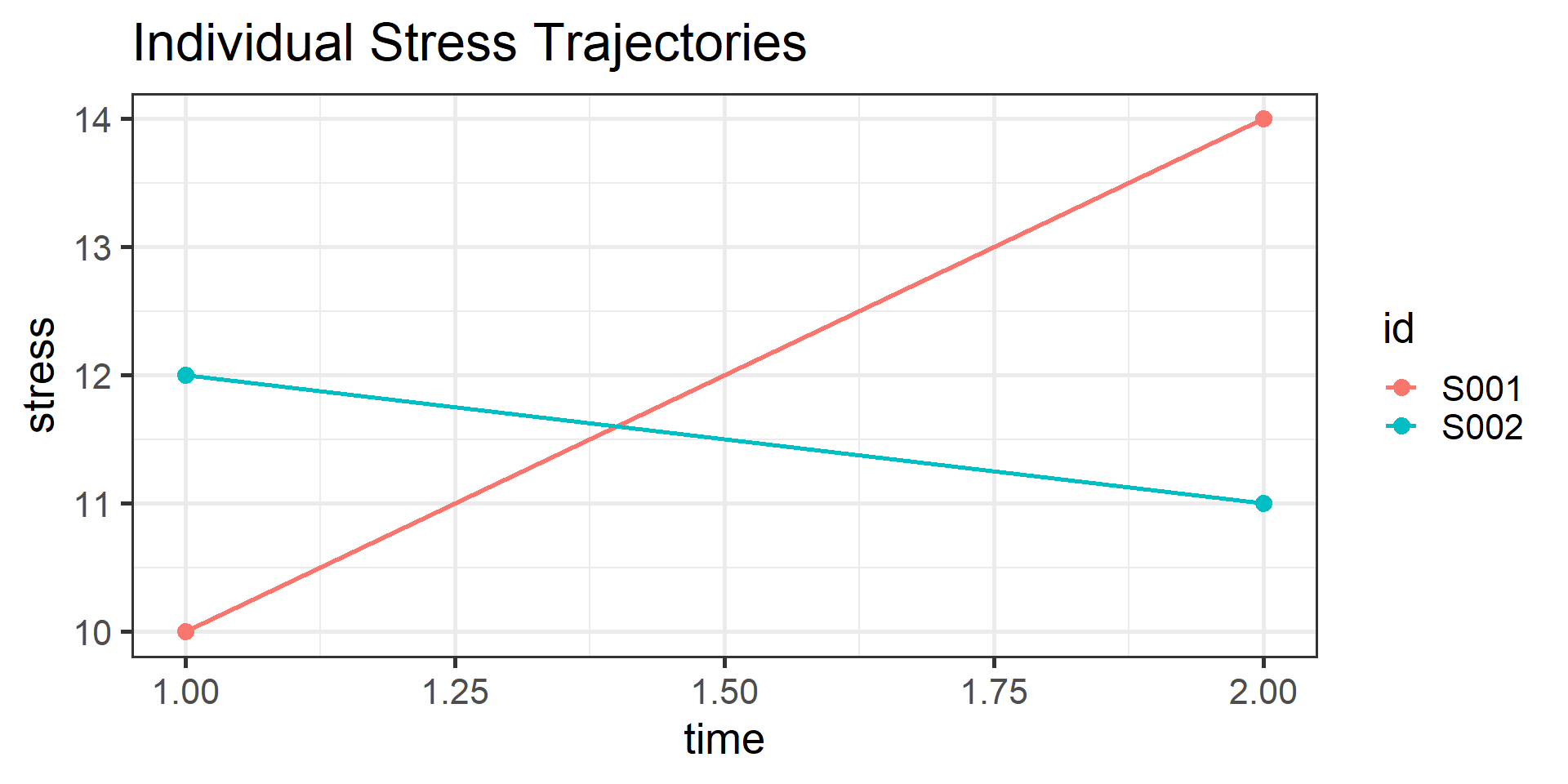
The Payoff: Visualizing Change

# Now that our data is in long-format, we can easily plot it by participant!
ggplot(long_real, aes(x = time, y = stress, color = id)) +
  geom_line() + 
  geom_point() +
  labs(title = "Individual Stress Trajectories") +
  theme_bw(base_size = 20)

Handling Hierarchy

Split–Apply–Combine

In MLM, we often need to calculate statistics per cluster
(e.g., school average math score). We do this using .by.

  1. Split the data into groups (Schools).
  2. Apply a calculation to each group (Mean).
  3. Combine the results back into the dataframe.
  • summarize(.by) is useful for data exploration
  • mutate(.by) will prepare the data for MLM

Aggregating (Summarize)

# To create a L2 dataset (e.g., summaries per school), we use summarize(.by)
school_means <- 
  heck |> 
  summarize(
    .by = school,
    school_math_mean = mean(math, na.rm = TRUE),
    n_students = n()
  ) |> 
  print()
# A tibble: 419 × 3
  school school_math_mean n_students
   <dbl>            <dbl>      <int>
1      1             59.0         12
2      2             63.6         13
3      3             47.6         18
4      4             65.7         17
5      5             48.1         17
6      6             61.0         16
# ℹ 413 more rows

Annotating (Mutate)

# To simply add L2 summaries to the L1 dataset, we use mutate(.by)
heck_with_means <- 
  heck |> 
  mutate(
    .by = school,
    school_math_mean = mean(math, na.rm = TRUE)
  ) |> 
  print()
# A tibble: 6,871 × 8
  school student female    ses  math  puniv public school_math_mean
   <dbl>   <dbl>  <dbl>  <dbl> <dbl>  <dbl>  <dbl>            <dbl>
1      1    6701      1  0.586  47.1 0.0833      0             59.0
2      1    6702      1  0.304  63.6 0.0833      0             59.0
3      1    6703      1 -0.544  57.7 0.0833      0             59.0
4      1    6704      0 -0.848  53.9 0.0833      0             59.0
5      1    6705      0  0.001  58.0 0.0833      0             59.0
6      1    6706      0 -0.106  59.9 0.0833      0             59.0
# ℹ 6,865 more rows

Tip

Note that school_math_mean is repeated for every student in the same school. This is what MLM wants!

Merging: The Setup

Sometimes your data comes in separate files per level…

1. Level 1 Data (People)

  • Contains individual variables and the grouping ID (country).
L1_people
# A tibble: 4 × 4
    pid sex   income country
  <int> <chr>  <dbl> <chr>  
1     1 M         50 Japan  
2     2 F         55 Japan  
3     3 F         42 France 
4     4 M         48 France 

2. Level 2 Data (Countries)

  • Contains cluster-level variables and the same grouping ID (country)
L2_countries
# A tibble: 4 × 3
  country continent   gdp
  <chr>   <chr>     <dbl>
1 China   Asia      38.2 
2 Japan   Asia       6.45
3 France  Europe     4.29
4 Germany Europe     6.14

Merging: The Join

merged_data <- 
  left_join(
    x = L1_people,    # The Level 1 file (Start with the detailed data)
    y = L2_countries, # The Level 2 file (Bring in the context)
    by = "country"    # The linking variable (cluster ID)
  ) |> 
  print()
# A tibble: 4 × 6
    pid sex   income country continent   gdp
  <int> <chr>  <dbl> <chr>   <chr>     <dbl>
1     1 M         50 Japan   Asia       6.45
2     2 F         55 Japan   Asia       6.45
3     3 F         42 France  Europe     4.29
4     4 M         48 France  Europe     4.29
  • Notice that Asia and 4.2 were copied for both participants in Japan
  • This creates the rectangular, long-format dataset required for MLM
  • Notice that China and Germany are excluded (no participants from there!)