Multilevel Modeling

Longitudinal Fluctuation

Spring 2026 | CLAS | PSYC 894
Jeffrey M. Girard | Lecture 11b

Roadmap

  1. Longitudinal Fluctuation
    • Longitudinal Taxonomy
    • State vs. Trait Predictors
  2. Advanced Applications
    • State-Trait Automoderation
    • Spatial Exponential Errors

Longitudinal Concepts

Taxonomy of Longitudinal Models

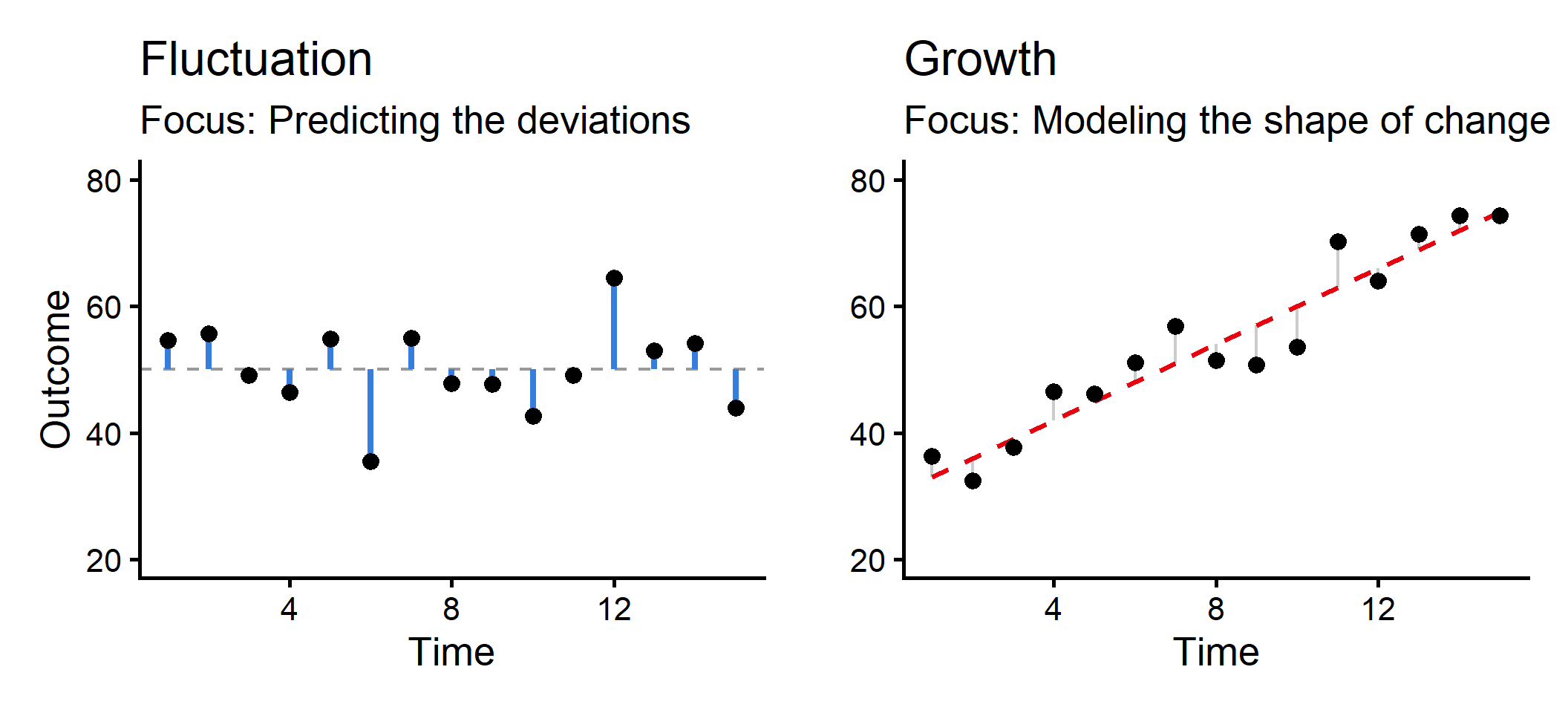
  • Fluctuation Models: The outcome rises and falls around a stable baseline. There is no systematic long-term trajectory. (Covered this week)
    • Example: Daily mood, daily stress, heart rate.
  • Growth Curve Models: The outcome systematically changes over time,
    e.g., increasing, decreasing, or curving. (Covered next week)
    • Example: Child vocabulary acquisition, therapy outcomes.
  • Lagged Change Models: We care about how the outcome at Time t predicts the outcome at Time t+1. (Not covered in this course, difficult with MLM)
    • Example: Does poor sleep tonight predict lower mood tomorrow?

Visualizing Fluctuation and Growth

Modeling Fluctuation

Overview

  • Fluctuation models are perfect for Ecological Momentary Assessment (EMA) or daily diary designs.
  • We want to know how temporary changes in a predictor (a state) relate to temporary changes in an outcome.
  • To do this correctly, we must decompose our Level 1 predictors.

The EMA Example

Main Variables

  • Outcome = performance (numeric score on a daily task)
  • Predictor = stress (self-reported daily stress)
  • Time = studyday_frac (the exact fractional day of the study)

Research Question

  • Does a person’s daily stress (state) predict their daily performance, and does their average stress (trait) predict their average performance?

Example Data

library(tidyverse)
library(glmmTMB)
library(easystats)

ema <- read_csv("ema_sim.csv")
glimpse(ema)
Rows: 984
Columns: 5
$ subject       <dbl> 1, 1, 1, 1, 1, 1, 1, 1, 1, 1, 1, 1, 2, 2, 2, 2, 2, 2, 2,…
$ studyday      <dbl> 1, 2, 3, 4, 5, 6, 8, 9, 11, 12, 13, 14, 2, 4, 6, 7, 8, 9…
$ studyday_frac <dbl> 0.38, 1.79, 2.58, 3.38, 4.58, 5.38, 7.79, 8.79, 10.38, 1…
$ performance   <dbl> 0.3931740, -0.6519368, -0.2248937, 6.9142306, 3.0286161,…
$ stress        <dbl> 7.905561, 6.861336, 7.377380, 5.361727, 7.055506, 5.0369…
  • We plan to predict performance (L1) from stress (L1) for each subject.
  • Participants are pinged at random hours across the study.

L1 Predictor Decomposition

If we use stress as a predictor, its slope will be an uninterpretable blend of the within-person and between-person effects. We must first decompose it!

ema_prep <- ema |> 
  mutate(
    .by = subject,
    stress_b = mean(stress, na.rm = TRUE), # Trait (L2)
    stress_w = stress - stress_b           # State (L1)
  ) |> 
  print(n = 3)
# A tibble: 984 × 7
  subject studyday studyday_frac performance stress stress_b stress_w
    <dbl>    <dbl>         <dbl>       <dbl>  <dbl>    <dbl>    <dbl>
1       1        1          0.38       0.393   7.91     6.41    1.50 
2       1        2          1.79      -0.652   6.86     6.41    0.455
3       1        3          2.58      -0.225   7.38     6.41    0.971
# ℹ 981 more rows

How important was this?

Calculating the predictor’s ICC can help us understand its multilevel structure

fit_stress <- glmmTMB(stress ~ 1 + (1 | subject), data = ema)
icc(fit_stress)
# Intraclass Correlation Coefficient

    Adjusted ICC: 0.644
  Unadjusted ICC: 0.644
  • ICC near 0: The variable is almost entirely a state. Everyone has the same baseline, and all the action is in day-to-day fluctuation.
  • ICC near 1: The variable is almost entirely a trait. People differ from one another, but their daily scores never change from their baseline.
  • ICC in between: The variable has meaningful variance at both levels. We must decompose it to avoid an uninterpretable, blended slope.

Multilevel Equation

Level One (Observation)

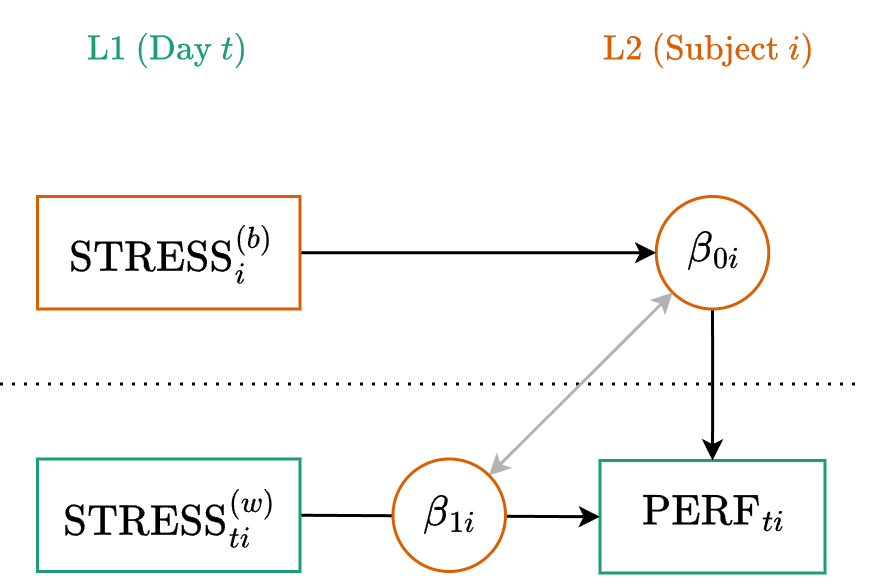
\[y_{ti} = \beta_{0i} + \beta_{1i} x_{ti}^{(w)} + \color{#4daf4a}{e_{ti}}\]

Level Two (Cluster)

\[\begin{align} \beta_{0i} &= \color{#377eb8}{\gamma_{00}} + \color{#377eb8}{\gamma_{01}} x_{i}^{(b)} + \color{#e41a1c}{u_{0i}} \\ \beta_{1i} &= \color{#377eb8}{\gamma_{10}} + \color{#e41a1c}{u_{1i}} \end{align}\]

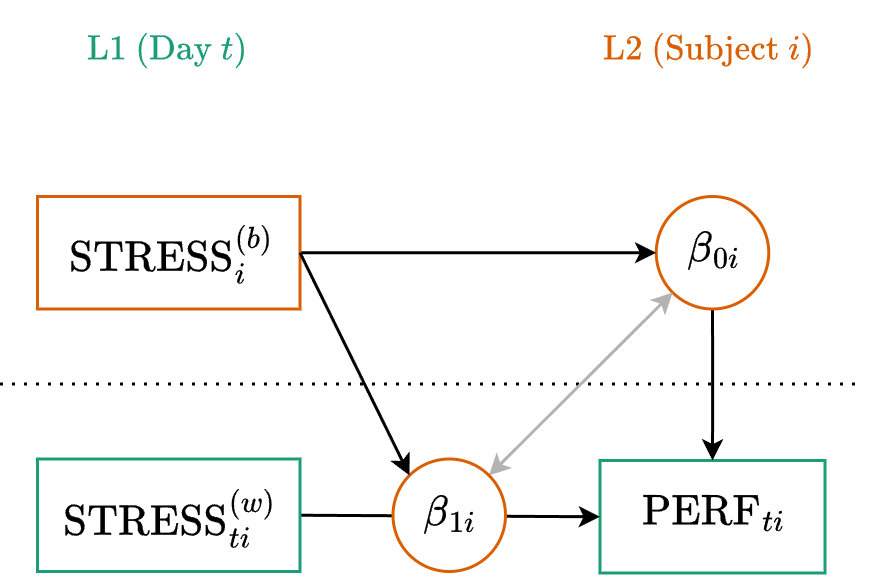
Path Diagram

Mixed (or Reduced) Equation

Substitute the L2 equations directly into the L1 equation:

\[y_{ti} = (\color{#377eb8}{\gamma_{00}} + \color{#377eb8}{\gamma_{01}} x_{i}^{(b)} + \color{#e41a1c}{u_{0i}}) + (\color{#377eb8}{\gamma_{10}} + \color{#e41a1c}{u_{1i}}) x_{ti}^{(w)} + \color{#4daf4a}{e_{ti}}\]

Distribute and rearrange to group the fixed and random parts:

\[y_{ti} = \underbrace{\color{#377eb8}{\gamma_{00}} + \color{#377eb8}{\gamma_{01}} x_{i}^{(b)} + \color{#377eb8}{\gamma_{10}} x_{ti}^{(w)}}_{\text{Fixed}} + \underbrace{\color{#e41a1c}{u_{0i}} + \color{#e41a1c}{u_{1i}} x_{ti}^{(w)}}_{\text{Random}} + \color{#4daf4a}{e_{ti}}\]

Formula

\[y_{ti} = \underbrace{\color{#377eb8}{\gamma_{00}} + \color{#377eb8}{\gamma_{01}} x_{i}^{(b)} + \color{#377eb8}{\gamma_{10}} x_{ti}^{(w)}}_{\text{Fixed}} + \underbrace{\color{#e41a1c}{u_{0i}} + \color{#e41a1c}{u_{1i}} x_{ti}^{(w)}}_{\text{(Random)}} + \color{#4daf4a}{e_{ti}}\]

Generic

y ~ 1 + x_b + x_w + (1 + x_w | cluster)

where the 1 + x_b + x_w part is fixed
and the (1 + x_w | cluster) part is random

Example

performance ~ 1 + stress_b + stress_w
+ (1 + stress_w | subject)

Fitting the Model

fit_base <- glmmTMB(
  formula = performance ~ 1 + stress_b + stress_w + (1 + stress_w | subject),
  data = ema_prep
)
model_parameters(fit_base, effects = "fixed")
# Fixed Effects

Parameter   | Coefficient |   SE |         95% CI |      z |      p
-------------------------------------------------------------------
(Intercept) |       12.23 | 1.78 | [ 8.73, 15.72] |   6.85 | < .001
stress b    |       -2.28 | 0.35 | [-2.97, -1.59] |  -6.46 | < .001
stress w    |       -2.41 | 0.10 | [-2.60, -2.22] | -25.11 | < .001

Both traits and states matter. People with higher average stress perform worse overall \((\gamma_{01}=-2.06)\). Additionally, on days when a person is more stressed than their own baseline, their performance drops further \((\gamma_{10}=-0.96)\).

Interpreting the Random Effects

model_parameters(fit_base, effects = "random")
# Random Effects

Parameter                         | Coefficient | 95% CI
--------------------------------------------------------
SD (Intercept: subject)           |        5.16 |       
SD (stress_w: subject)            |        0.41 |       
Cor (Intercept~stress_w: subject) |       -0.29 |       
SD (Residual)                     |        2.90 |       
  • SD (Intercept) (\(\tau_{00}=4.94\)): Even after accounting for trait stress, there is substantial variation in people’s baseline performance.
  • SD (stress_w) (\(\tau_{11}=0.64\)): The penalty for a stressful day is not identical for everyone. Some people are more reactive to daily stress than others.
  • Cor (Intercept~stress_w) (\(\tau_{10}=0.01\)): There is virtually no correlation between baseline performance and stress reactivity.
  • SD (Residual) (\(\sigma=2.78\)): The remaining daily fluctuation in performance that is not explained by state stress.

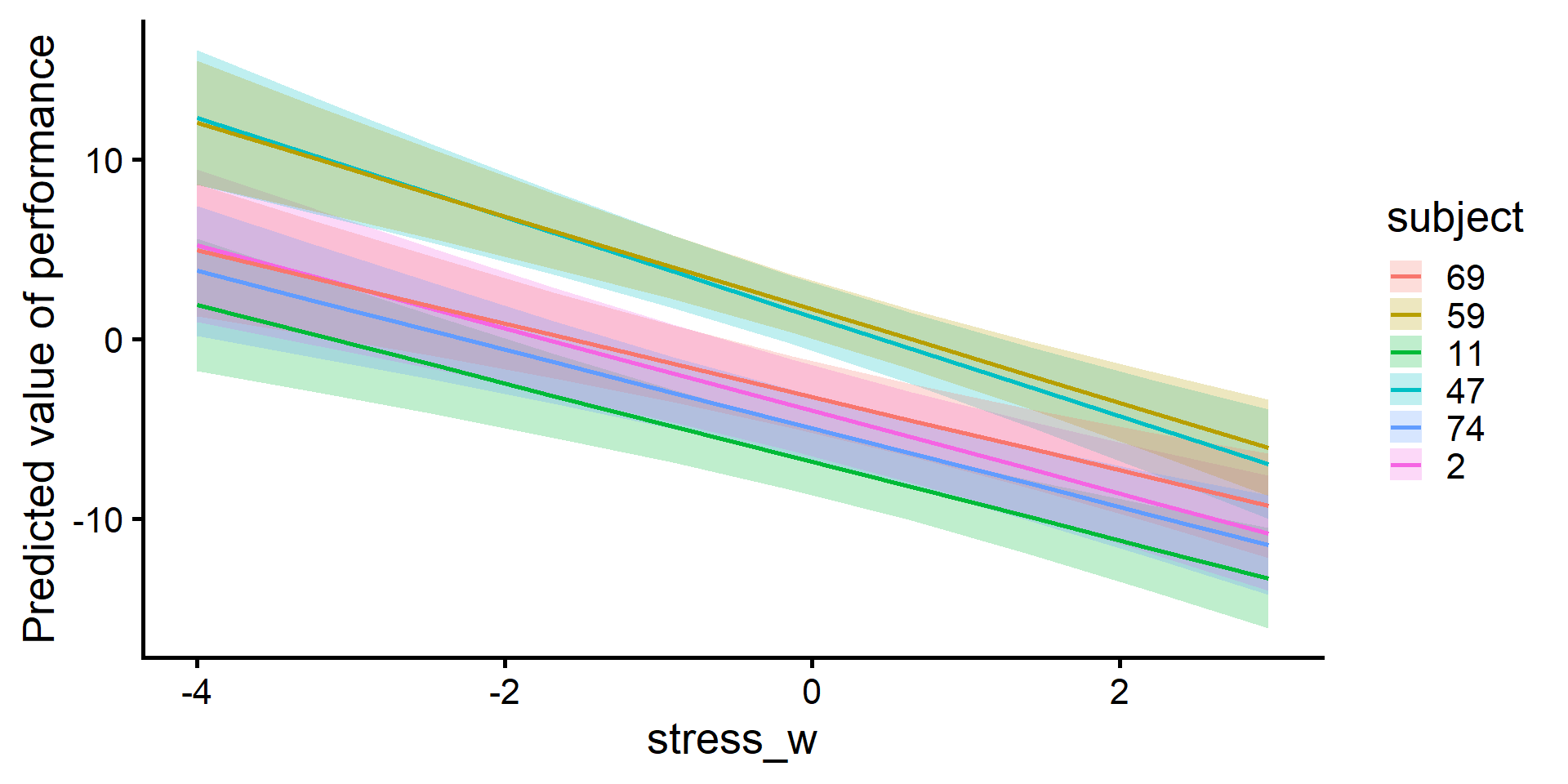
Visualizing Random Effects

estimate_relation(fit_base, by = c("stress_w", "subject=[sample 6]")) |> plot()

Auto-Moderation

Stress Reactivity

Now that we have separated stress into Trait (L2) and State (L1) components, we can ask a more complex theoretical question.

Does a person’s average stress level (Trait) moderate their reactivity to daily stress fluctuations (State)?

Hypothesis: People who are chronically stressed may lack the coping resources to handle bad days. Therefore, the negative effect of daily stress on performance will be even stronger (steeper) for individuals with high average stress.

Multilevel Equation

Level One (Observation)

\[y_{ti} = \beta_{0i} + \beta_{1i} x_{ti}^{(w)} + \color{#4daf4a}{e_{ti}}\]

Level Two (Cluster)

\[\begin{align} \beta_{0i} &= \color{#377eb8}{\gamma_{00}} + \color{#377eb8}{\gamma_{01}} x_{i}^{(b)} + \color{#e41a1c}{u_{0i}} \\ \beta_{1i} &= \color{#377eb8}{\gamma_{10}} + \underbrace{\color{#377eb8}{\gamma_{11}} x_{i}^{(b)}}_{\text{New}} + \color{#e41a1c}{u_{1i}} \end{align}\]

Path Diagram

Fitting the Model

fit_auto <- glmmTMB(
  formula = performance ~ 1 + stress_b * stress_w + (1 + stress_w | subject),
  data = ema_prep
)
model_parameters(fit_auto, effects = "fixed")
# Fixed Effects

Parameter           | Coefficient |   SE |         95% CI |     z |      p
--------------------------------------------------------------------------
(Intercept)         |       11.56 | 1.68 | [ 8.27, 14.85] |  6.89 | < .001
stress b            |       -2.14 | 0.33 | [-2.79, -1.50] | -6.49 | < .001
stress w            |       -1.26 | 0.31 | [-1.86, -0.65] | -4.08 | < .001
stress b × stress w |       -0.23 | 0.06 | [-0.35, -0.12] | -3.90 | < .001

Simple Slopes Analysis

estimate_slopes(fit_auto, slope = "stress_w", by = "stress_b=[quartiles]")
Estimated Marginal Effects

stress_b | Slope |   SE |         95% CI |      z |      p
----------------------------------------------------------
3.94     | -2.17 | 0.11 | [-2.38, -1.96] | -20.08 | < .001
4.74     | -2.36 | 0.09 | [-2.54, -2.18] | -26.01 | < .001
5.93     | -2.64 | 0.11 | [-2.85, -2.43] | -24.54 | < .001

Marginal effects estimated for stress_w
Type of slope was dY/dX

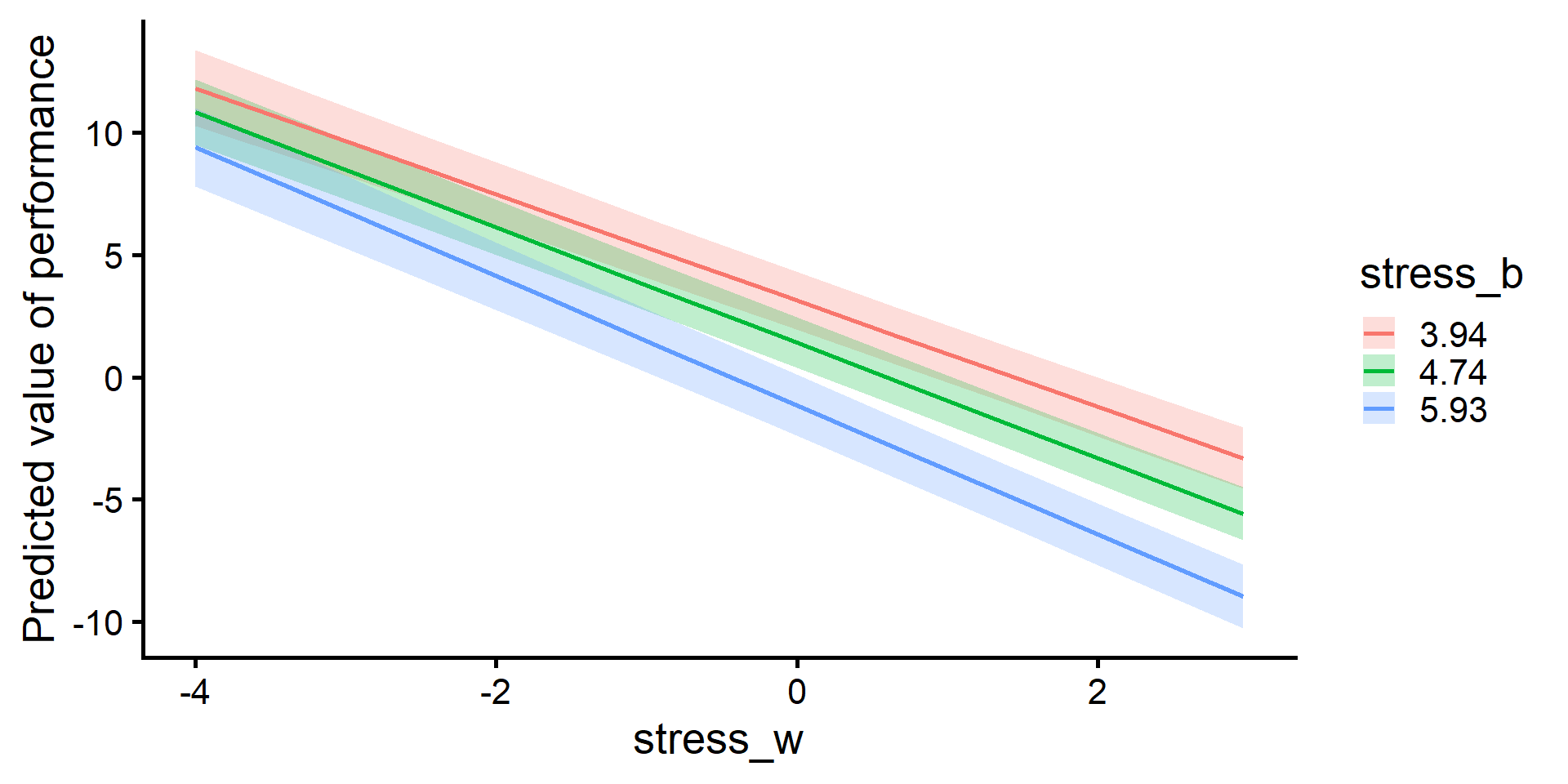
The performance cost of daily (state) stress is largest for those with higher average (trait) stress. There is evidence of a “compounding” effect.

Visualizing the Model

estimate_relation(fit_auto, by = c("stress_w", "stress_b=[quartiles]")) |> plot()

Continuous Time

The Unequal Time Problem

  • ar1() assumes that the time between consecutive steps is identical.
  • In EMA designs, participants may be pinged at different times of day.
ema_prep |> filter(subject == 1) |> print(n = 3)
# A tibble: 12 × 7
  subject studyday studyday_frac performance stress stress_b stress_w
    <dbl>    <dbl>         <dbl>       <dbl>  <dbl>    <dbl>    <dbl>
1       1        1          0.38       0.393   7.91     6.41    1.50 
2       1        2          1.79      -0.652   6.86     6.41    0.455
3       1        3          2.58      -0.225   7.38     6.41    0.971
# ℹ 9 more rows

The gap between the 9 AM and 2 PM prompts is 5 hours, but the overnight gap is 14 hours. Because discrete ar1() just looks at the sequence of steps, it forces the 5-hour gap and the 14-hour gap to have the exact same correlation!

The Spatial Exponential Model

  • This covariance structure calculates the true time gap \((\Delta t=|t-t'|)\) between any two observations to handle continuous fractional time.

\[\color{#4daf4a}{\mathbf{v}_i} \sim \text{EXP}(0, \color{#4daf4a}{\sigma_v}, \color{#4daf4a}{\rho})\]

\[\text{Corr}(v_{ti}, v_{t'i}) = \rho^{\Delta t}\]

  • \(\color{#4daf4a}{\sigma_v}\): The amount of autocorrelated error.
  • \(\color{#4daf4a}{\rho}\): The strength of the autocorrelation (for a 1-unit time gap).

The Exponential Decay in Action

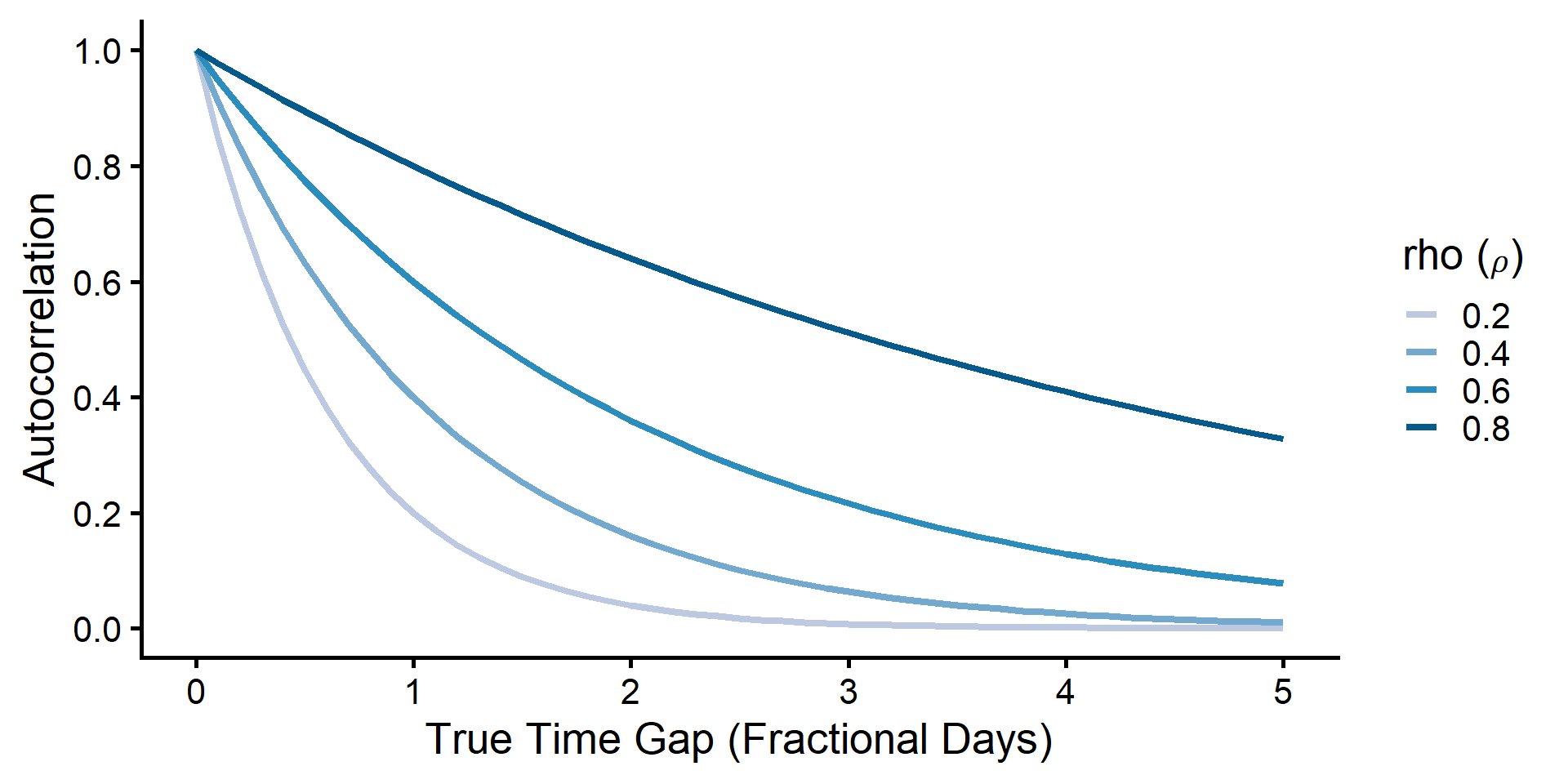
Because the correlation structure follows an exponential decay \((\rho^{\Delta t})\), the autocorrelation carrying over from one prompt to the next depends heavily on your baseline 1-day strength \((\rho)\).

Weak Autocorrelation (\(\rho = 0.20\))

  • 0.5-Day Gap: \(0.20^{0.5} = 0.45\)
  • 1.5-Day Gap: \(0.20^{1.5} = 0.09\)

Strong Autocorrelation (\(\rho = 0.80\))

  • 0.5-Day Gap: \(0.80^{0.5} = 0.89\)
  • 1.5-Day Gap: \(0.80^{1.5} = 0.72\)

The math automatically scales the correlation dynamically based on the exact fractional distance between observations.

Visualizing the Decay

Prepping the Time Factor

To use the exp() covariance structure, we need to convert our continuous time variable into a special sorted number factor.

ema_clean <- 
  ema_prep |> 
  # Sort by exact time within subjects
  arrange(subject, studyday_frac) |> 
  # Create a numFactor for exp() using the continuous variable
  mutate(time = numFactor(studyday_frac)) |> 
  print(n = 3)
# A tibble: 984 × 8
  subject studyday studyday_frac performance stress stress_b stress_w time  
    <dbl>    <dbl>         <dbl>       <dbl>  <dbl>    <dbl>    <dbl> <fct> 
1       1        1          0.38       0.393   7.91     6.41    1.50  (0.38)
2       1        2          1.79      -0.652   6.86     6.41    0.455 (1.79)
3       1        3          2.58      -0.225   7.38     6.41    0.971 (2.58)
# ℹ 981 more rows

Fitting the Exponential Model

We simply add the exp() term and use our continuous time factor.

fit_exp <- glmmTMB(
  formula = performance ~ 
    1 + stress_b * stress_w +       # fixed Effects
    (1 + stress_w | subject) +      # random Effects
    exp(0 + time | subject),   # exp by time (no intercept)
  data = ema_clean
)
model_parameters(fit_exp, effects = "fixed")
# Fixed Effects

Parameter           | Coefficient |   SE |         95% CI |     z |      p
--------------------------------------------------------------------------
(Intercept)         |       11.57 | 1.67 | [ 8.29, 14.84] |  6.92 | < .001
stress b            |       -2.14 | 0.33 | [-2.79, -1.50] | -6.52 | < .001
stress w            |       -1.21 | 0.27 | [-1.74, -0.68] | -4.46 | < .001
stress b × stress w |       -0.25 | 0.05 | [-0.35, -0.14] | -4.68 | < .001

Did the Exponential Decay Help?

# Compare to our baseline auto-moderation model
test_lrt(fit_auto, fit_exp)
# Likelihood-Ratio-Test (LRT) for Model Comparison (ML-estimator)

Name     |   Model | df | df_diff |   Chi2 |      p
---------------------------------------------------
fit_auto | glmmTMB |  8 |         |        |       
fit_exp  | glmmTMB | 10 |       2 | 255.03 | < .001
compare_performance(fit_auto, fit_exp, metrics = c("AIC", "BIC"))
# Comparison of Model Performance Indices

Name     |   Model |  AIC (weights) |  BIC (weights)
----------------------------------------------------
fit_auto | glmmTMB | 5251.5 (<.001) | 5290.6 (<.001)
fit_exp  | glmmTMB | 5000.4 (>.999) | 5049.3 (>.999)