A figure div on the left
The figure on this page is a div. Its caption is the div’s last paragraph:
::: {#fig-groups .wrap-left width="35%"}

Scores by hours of practice in two groups.
:::Result
Each participant practiced for some number of hours and then took a test. The figure in this section plots each test score against the hours of practice, with one color for each of the two groups. This paragraph comes before the figure, so it runs the full width of the text.
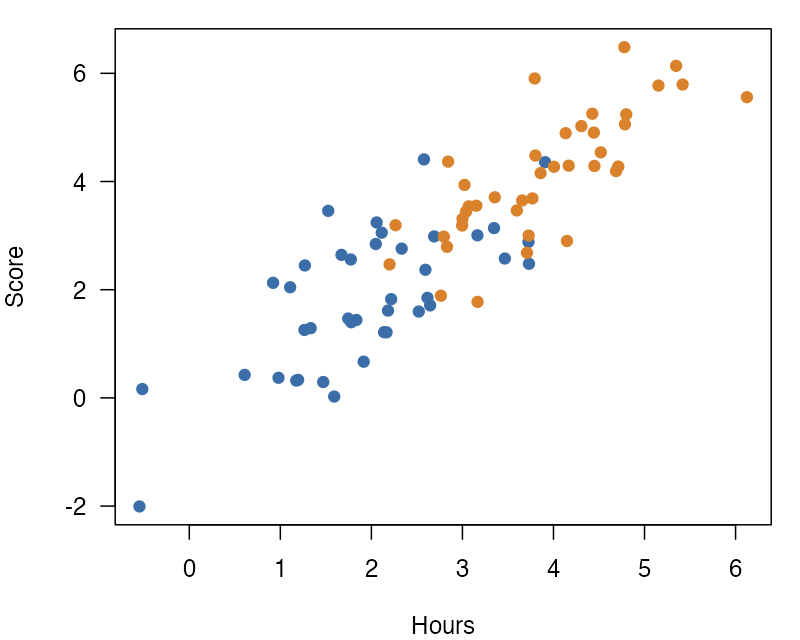
Figure 1 shows each participant’s score against the hours that they practiced. Scores rose with practice in both groups, and the second group practiced more hours.
The class .wrap-left puts the figure on the left side of the text, so this text flows on its right. The figure is 35% of the text width, a little narrower than the default of 40%. The div form puts the caption in its own paragraph, which is easier to read and edit when the caption is long. The caption sits under the image, inside the figure’s width. The figure keeps its number, so the text can point to it. The lines of this paragraph start beside the figure. Its last lines start at the left edge of the text again and run under the figure. The text reads as one block around the figure, not as two columns side by side. Wrapping goes on in this way until the next block that is not a paragraph, such as the heading below.
Next
A heading is not a paragraph, so wrapping stops before it.