A captioned image
The figure on this page comes from one line of markdown:
{#fig-ratings .wrap-right width="40%"}Result
Participants rated each clip on a scale from one to five. The study compared a control condition with a treatment condition, and the figure in this section shows the mean rating in each one. This paragraph comes before the figure, so it runs the full width of the text.
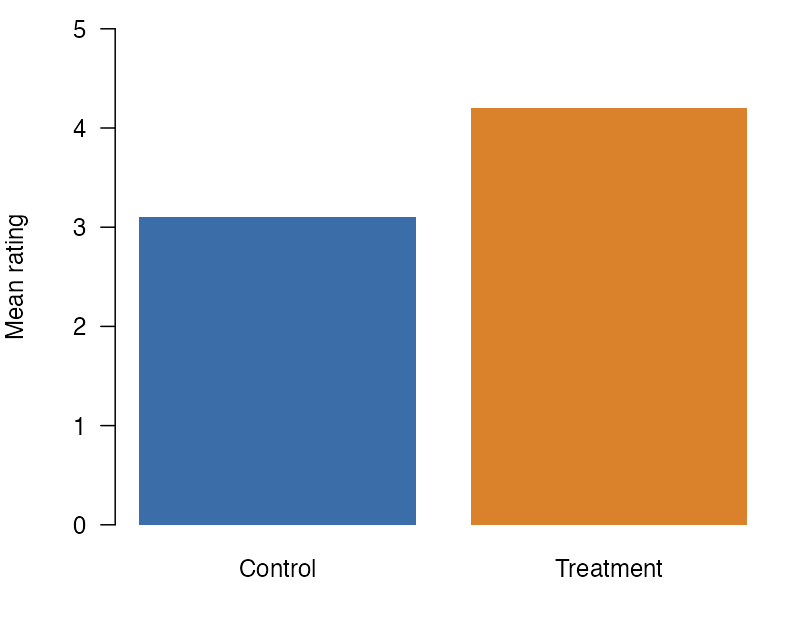
Figure 1 shows that ratings in the treatment condition were higher than ratings in the control condition. The figure keeps its number and its caption, and this paragraph can point to it with a @fig- link.
The class .wrap-right puts the figure on the right side of the text, and the width attribute makes it 40% of the text width. The paragraphs after the figure flow on its left. Each format draws this layout with its own tools: CSS in HTML, wrapfig in LaTeX, wrap-it in Typst, and a frame in Word. The text does not stay in a column of its own. The first lines of this paragraph sit beside the figure, and its last lines run from the left edge of the text to the right edge, under the figure. Two columns or a table cannot give this layout, because their text stays in its own column from top to bottom. The figure’s number comes from its id, #fig-ratings, as it does for any figure in Quarto. Wrapping goes on in this way until the next block that is not a paragraph, such as the heading below.
Next
A heading is not a paragraph, so wrapping stops before it.